Flashforge Adventurer 3 Reviews: See Why 0 Shoppers Rated It 0 Stars!
Before trusting the stars, check what 0 gadget users said about the Flashforge Adventurer 3 3d printer. That 0/5 might not tell the full story.
 Supermod
 Moderator
 Recaptor
Flashforge Adventurer 3 3D Printer Review: A Reliable Choice for Beginners and Educators
When exploring consumer-grade FDM/FFF 3D printers, the Flashforge Adventurer 3 stands out as a compelling option designed for beginners and educational environments. Released in 2018 by Flashforge, a reputable Chinese manufacturer, this prebuilt 3D printer aims to simplify complex prototyping and engineering tasks while supporting novice users and intermediate enthusiasts. On paper, its specs showcase a well-rounded device with a compact footprint and user-friendly features that promise smooth entry into 3D printing without overwhelming technical complexity. But does it really live up to its measured capabilities in real-world terms? Let's dive into the specs and see what makes the Adventurer 3 tick.
Specifications and Features Breakdown
From a dimensional standpoint, the Adventurer 3 offers a balanced form factor at 15.3 inches wide, 13.4 inches deep, and 16 inches tall, fitting comfortably into both personal workspaces and classrooms. Weighing just under 20 pounds, it's also fairly portable compared to bulkier counterparts. The build volume maxes out at 205.4 cubic inches, realized through a cubic 5.9-inch dimension on all axes, which suits standard prototype sizes. Powered via an internal supply with a wide 100 to 240 Volt range, it maintains a moderate consumption of 150 watts, aligning well with energy-conscious setups.
You'll note a safe operating range from 59°F to 86°F, which is typical for desktop printers and ensures stability across various home or school environments. Delving into its printing prowess, the Adventurer 3 sports a 0.4mm nozzle with an option for 0.3mm precision, an extruder temperature ceiling of 509°F, and a heated bed topping out at 212°F. These parameters support common filaments like PLA and ABS, both of which are readily compatible given the 1.75mm filament diameter standard. Moreover, the inclusion of a quick-swap nozzle system and replaceable hotend encourages easy maintenance and future upgrades within this framework.
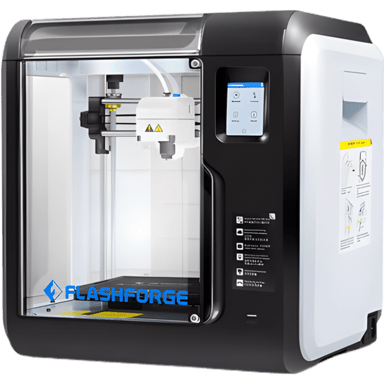
On the digital side, users can connect via USB, Wi-Fi, LAN, and even cloud-based controls, while remote monitoring, multi-printer fleet management, and firmware updates, both local and remote, underscore its modern connectivity features. The 2.8-inch touchscreen shapes an intuitive interface, complemented by a built-in camera that helps with remote print observation, making it practical for both classrooms and smaller-scale professional settings. The printer runs on FlashPrint, a proprietary slicing software designed for its hardware, supporting typical 3D file formats like STL and G-code. Overall, these specifications not only position the Adventurer 3 as versatile for various printing needs but also user-centric in build and connectivity design.
User Experience and Performance Expectations
Design & Build
The Adventurer 3 features a closed Cartesian frame that safely secures the printing space inside an enclosure. This reduces exposure to fumes, especially useful when printing with ABS filament, and helps maintain a stable thermal environment. Its lightweight 19.85-pound build, combined with a compact footprint, implies a low space requirement of 1.4 cubic feet, which is a boon for desktop use.
The closed design also prevents dust and debris interference, supporting reliable print quality over time. Internal cooling fans maintain component temperatures efficiently, while a magnetic and flex build plate makes print removal more accessible and less prone to damage. The availability of automatic bed leveling is a standout feature here, streamlining the setup process for users without manual calibration expertise. These design elements together suggest a printer that is accessible for entry-level and educational users, yet sufficiently engineered for sustained daily use.
Performance
Performance-wise, Flashforge rates a maximum print speed of 150 mm/s, though more effective real-world speeds land around 100 mm/s to balance quality and precision. This is reflected in a respectable 60-minute time to print a standard Benchy model, a common community benchmark. The layer resolution ranges between 100 and 400 microns, allowing detailed prints with adequate surface finish quality for prototyping and educational demonstrations. Notably, the print success rate is rated at 95%, a confidence booster for newcomers concerned about failed prints wasting time and materials. The printer also incorporates filament auto-loading and a runout sensor, both of which contribute to uninterrupted printing sessions. Its noise level of 45 dB in operation is relatively quiet, supporting use in classrooms or small offices without causing distracting noise pollution. What makes this notable is how these performance points align closely with what users generally expect in budget-friendly, user-oriented 3D printers.
Camera & Display
The 2.8-inch touchscreen is crisp and responsive, providing a smart control interface. Complemented by the built-in camera, this enables remote monitoring through the printer's cloud platform, a feature often reserved for more expensive models. While there are no advanced sound features, the low operational noise and clear firmware responses contribute to a smooth user experience, encouraging uninterrupted focus on design or instruction.
Extra Features
Flashforge includes several safety certifications like CE, FCC, and RoHS, reassuring users of compliance with essential safety protocols. The presence of overheat protection and auto shutdown on error further enhances device safety during extended prints or unexpected issues. Although lacking advanced features like power-loss recovery or bed lighting, it covers critical safety and maintenance needs adequately. The scanner-friendly proprietary software and cloud management allow for multi-user profiles and remote access controls, suited for classroom or small business print farms, which demonstrates good foresight into professional usability beyond home use.
Pros & Cons
Pros
- User-friendly automated bed leveling and filament auto-loading simplify operation for beginners.
- Robust build quality with a closed Cartesian frame and a compact, lightweight design ideal for desktops.
- Strong connectivity suite, including cloud software and remote monitoring, offering versatility in print management.
- High print success rate and respectable precision across practical speed ranges.
Cons
- Limited build volume restricts larger projects or advanced prototyping.
- Lack of multi-material support or resin printing limits material versatility.
- Absent power loss recovery and advanced print failure detection are downsides for heavy users.
Price and Value For Money
Priced at approximately $300 at Walmart, the Adventurer 3 offers solid value, especially considering its one-year warranty period and extensive safety certifications. Given its warranty protection and a strong feature set, including a closed frame, touchscreen, and remote control options, the price feels justified within the entry-level to intermediate segment. For hobbyists, educators, or small businesses aiming to scale print farm management without a steep learning curve, this printer provides a reliable foundation. Users requiring more extensive build volumes or advanced multi-material prints might look beyond, but for its target audience, this strikes a compelling balance of affordability and capability.
Quick Take
In short, the Flashforge Adventurer 3 is a dependable 3D printer that delivers controlled, quality printing experiences optimized for learning and prototyping. Its automated calibration and connectivity features elevate its ease-of-use, while the compact, robust design suits both educational spaces and casual professional use. If we look at the numbers alone, it offers a foundational mix of precision, safety, and versatility at an accessible price point.
Closing Recommendation
The Adventurer 3 may be ideal for beginners and educators aiming to unlock 3D printing fundamentals reliably, without grappling with an overwhelming technical setup. It appears to perform best for small-scale prototyping where ease of use and consistent print quality matter more than industrial-scale volume or multi-material flexibility. Helping users achieve efficient print workflows with streamlined remote management, it stands as a solid entry-level platform backed by verified engineering and safety credentials.
Verdict
Rating: Based on the specifications and overall feature set, we believe Flashforge Adventurer 3 deserves 4.3 out of 5.
- Winner Feature => Automated bed leveling combined with broad connectivity options empowers beginner users and educators effectively.
- Needs Improvement => Limited build volume and absence of multi-material printing constrain advanced creative possibilities.
Reviews 0
The good, the bad, and the brutally honest.Average Rating


More 3D Printers 453
Unlock more awesome finds.